

The showroom
Four commissions, one workshop. Pick a request, watch the panel, and do not just look at the results. Click them. The calculator calculates, the quiz deals cards, and the follow-up messages in the chat move the artifact through its versions. Everything in that panel came from a sentence. Nobody opened a design tool, a slide deck, or an editor. The follow-ups are the real lesson: an artifact is not a one-shot render, it is a draft that holds still while you push on it, and every push is saved as a version you can walk back to. Here is the same panel in the real product, mid-commission: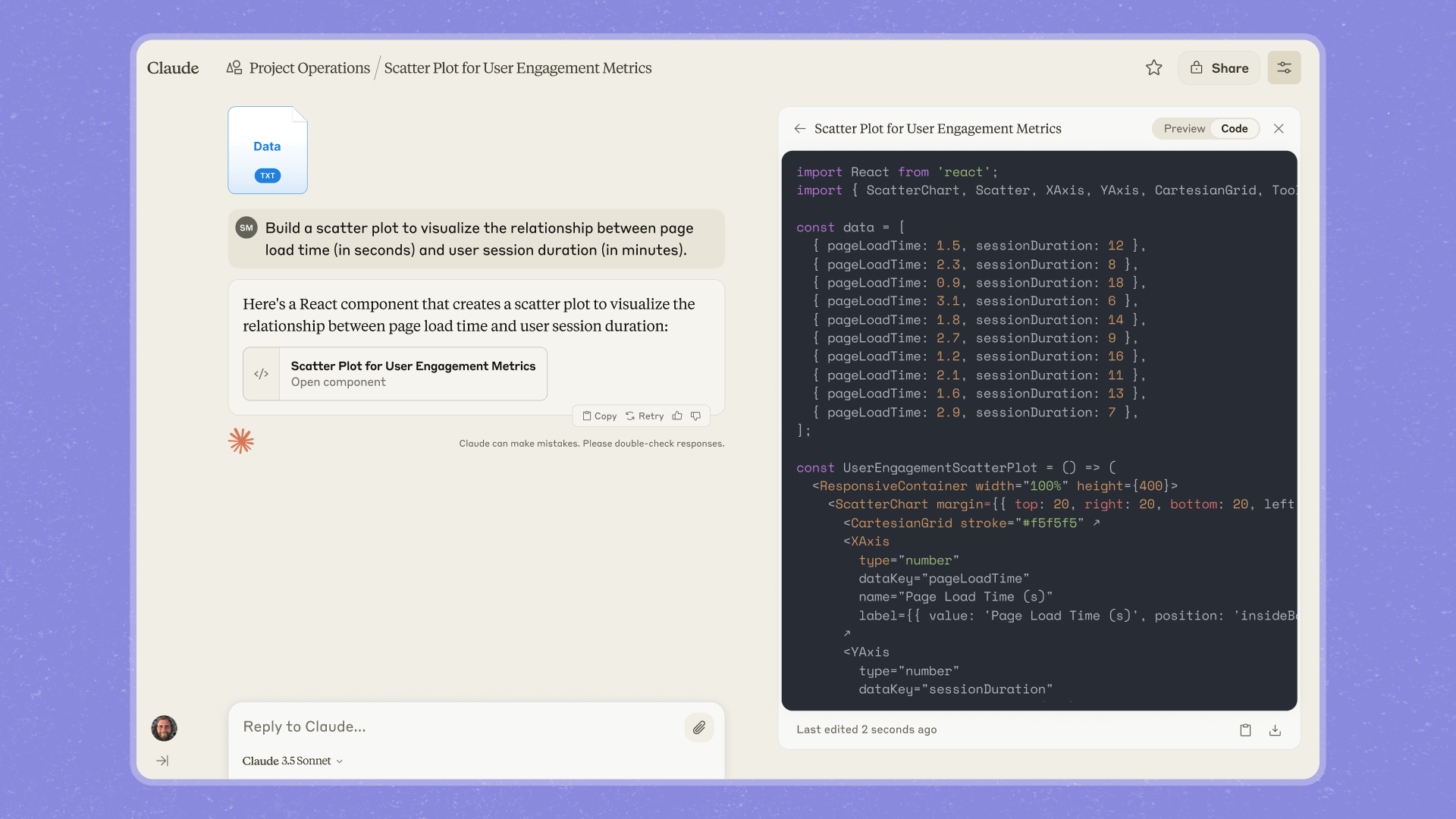
An artifact on claude.ai. Chat on the left, the deliverable on the right, and the Preview and Code toggle in the panel header.
What earns the panel
Claude promotes an answer to an artifact when it is substantial, standalone, and likely to be edited or reused. In practice, six families cover almost everything:Documents
Memos, briefs, plans, policies. Formatted, skimmable, ready to export.
Code
Scripts and components with syntax highlighting and a copy button.
Web pages
Real HTML and CSS, rendered live. Landing pages, emails, prototypes.
Diagrams and SVG
Flowcharts, funnels, logos, org charts. Vector graphics you can request changes to in plain English.
Interactive apps
Calculators, dashboards, games, trackers. Working software, built in the panel.
AI-powered apps
Artifacts that call Claude from inside themselves. The quiz in the showroom is one.
Apps with Claude inside
The last family deserves a second look. An artifact can make requests to Claude while it runs, which turns the panel into a place where you build small AI products: a quiz that writes new questions for any topic, a coach that adapts to the answer it just got, a triage tool that drafts the reply. The economics are the unusual part. When you share an AI-powered artifact, the people using it do not need API keys and do not bill you. Their usage counts against their own Claude subscription, whether your app helps ten people or ten thousand. You built software with a sentence, and distribution costs you nothing.Three facts people learn the hard way
- Artifacts do not save themselves to your sidebar. The panel belongs to the conversation that made it. Publish or share an artifact to pin it somewhere findable, or it lives only inside that chat.
- Claude does not always guess right. If it answers inline when you wanted a thing, say make this an artifact. If it spawned an artifact for something you wanted as throwaway text, say the opposite.
- Inside a project, artifacts inherit the project’s knowledge. Ask the Atlas project for a pricing calculator and it builds one with your real tiers, because the pricing sheet was already on the shelf.
Product reference: What are artifacts and how do I use them? in the official Claude Help Center.
Handoffs
An artifact sitting in your panel is still only yours. Next: publishing, sharing, and the other ways work leaves the building.